AI Trading Bot Suite
Your portfolio, on autopilot — with hard guardrails.
Pacekeeper runs two AI-driven bots — a stock bot for Trading212 and a prediction-market bot — behind a real-time dashboard, a visual strategy builder, and risk limits the AI cannot override.
macOS · Windows · Docker · source-available
What you get
Everything between an idea and a filled order.
Two bots, one suite
A stock trading bot for Trading212 (demo & live) and a prediction-market bot with paper trading — each with its own dashboard.
Bring your own AI
Anthropic Claude, OpenAI, Gemini, DeepSeek, Qwen, or fully local Ollama. One setup wizard configures the provider for both bots.
Hard risk guardrails
Stop-loss, take-profit, max open positions, max position size, and a confidence floor — enforced in code, not by the AI.
Strategy builder
Create strategies in a stepped wizard, start from ready-made presets, and run them as paper-trading shadows next to your live strategy.
Real-time dashboard
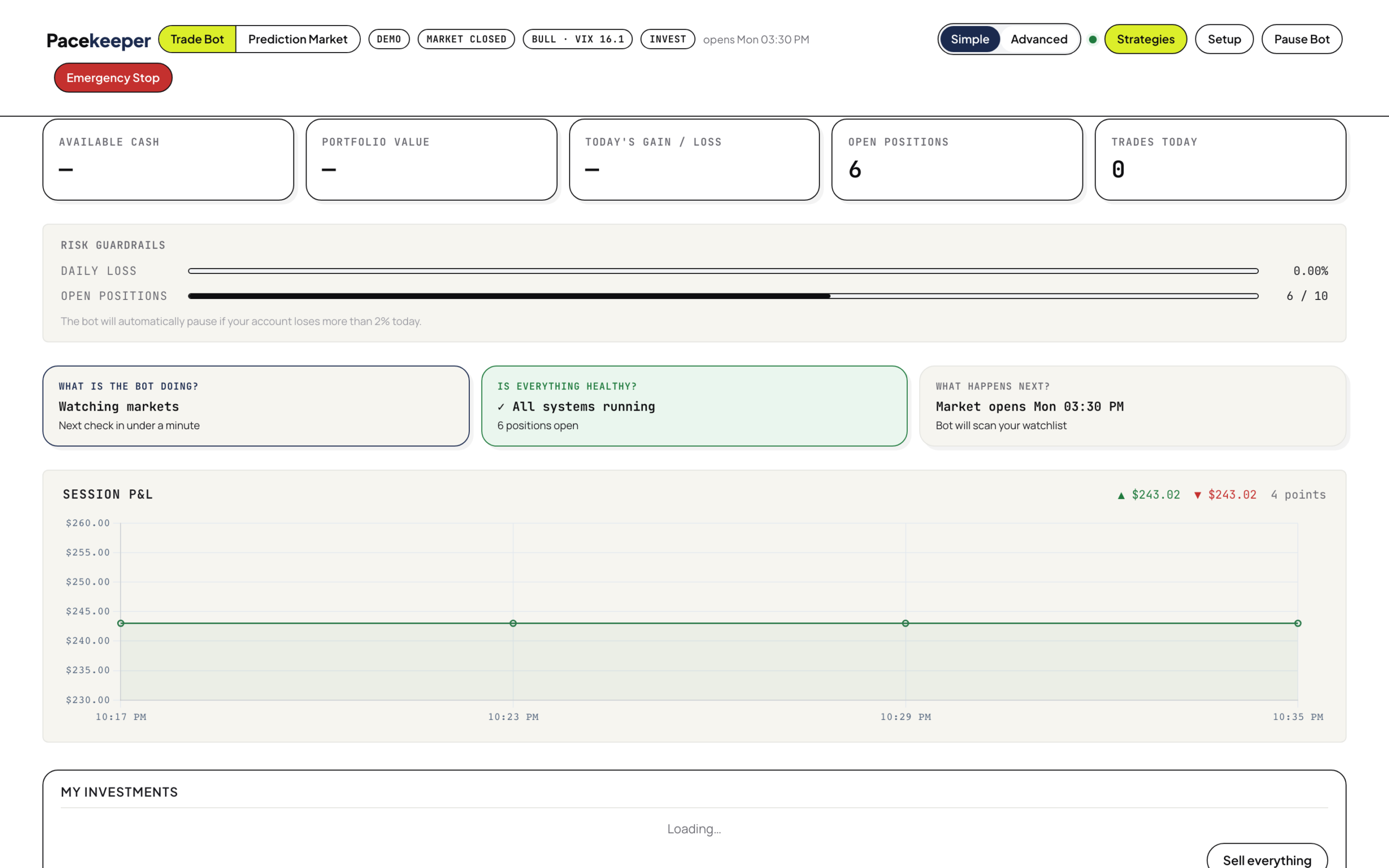
Simple and Advanced views, live P&L chart, signal history, one-click sell, and an Emergency Stop that closes everything.
Market-aware
Respects market hours, can block entries around earnings and macro events, and can extend your watchlist with a dynamic screener.
Paper trading first
Start in Trading212 demo mode with virtual money. Go live only when you flip the switch.
Desktop app included
Native macOS and Windows app: setup wizard, license activation, start/stop both bots — no terminal needed.
Self-hosted & source-available
Runs on your machine; your API keys never leave it. Read every line before you trust it with a trade.
See it in action
One product. Two bots. Two dashboards.

Deep dive · stock bot
Inside the Trading212 stock bot.
Every cycle, the bot reads your live portfolio, enforces exits first, asks the AI for new signals with full market context, and lets a deterministic risk manager approve or reject each one before any order is placed.
Signals with reasoning
The AI sees your full portfolio plus 30-day price history with SMA10/SMA30 and RSI14 indicators, and returns structured signals with a confidence score and written reasoning for every trade.
Market regime detection
The bot classifies the current market regime and adapts how aggressively it trades in trending, choppy, or risk-off conditions.
Earnings calendar
A built-in earnings calendar lets the bot avoid opening positions right before a company reports — one of the most common ways automated strategies get burned.
News feed
Relevant market news is pulled in and surfaced on the dashboard, giving the AI and you the same context.
Signal outcome tracking
Every signal is tracked from creation to exit, so you can see the strategy’s real hit rate over time instead of trusting a backtest.
Dynamic screener
Beyond your fixed watchlist, the screener can surface new candidates dynamically so the bot isn’t limited to the tickers you thought of.
Automatic exits first
Stop-loss and take-profit levels are checked and enforced at the start of every cycle — before any new position is considered.
Account flexibility
Works with Trading212 demo and live environments and supports Invest/ISA and CFD account types, with a rate-limit-safe API client.
Deep dive · prediction bot
Inside the prediction-market bot.
The prediction bot hunts for mispriced event markets on Polymarket and Kalshi: it scans, asks the AI to estimate the true probability of each event, and bets only when the market’s implied odds are meaningfully wrong.
Polymarket & Kalshi scanners
Dedicated clients continuously scan both platforms for active markets worth evaluating.
AI probability evaluator
The model estimates the real-world probability of each event and compares it to the market’s implied odds to find edge.
Paper trader & bankroll
Bets run against a virtual bankroll first, with full P&L tracking — no real money until you decide.
Strategy shadows
Build multiple strategies with presets and the stepped wizard, then run them side by side as paper-trading shadows to see which one actually wins.
Bet strategy selector
Choose how the bot sizes and selects bets — conservative to aggressive.
Independent dashboard
Runs as its own process with its own real-time dashboard, fully separate from the stock bot.
For power users
Built to be inspected and automated.
Full REST API
Everything the dashboard does is a documented endpoint: status, positions, orders, signal history, manual cycle trigger, close-all — script it however you like.
Live event stream
Dashboards update over a server-sent event stream — signals, trades, and account changes appear the moment they happen.
Plain-text configuration
Trade interval, watchlist, max positions, position sizing, stop-loss and take-profit are simple environment variables in a local .env file.
Docker or Python
Run with docker-compose up or straight from source in a Python virtualenv — your choice.
Auto-updating desktop app
The Tauri desktop app ships signed and notarized for macOS, builds for Windows via CI, and keeps itself up to date.
Safe by default
Ships with trading disabled and demo mode on. The recommended flow: load the dashboard, trigger one manual cycle, review the signals — then enable.
How it works
Four steps to your first (paper) trade.
1 · Download
Install the desktop app (macOS/Windows) or run from source / Docker.
2 · Activate
Paste the license key from your order confirmation email.
3 · Connect
Link Trading212 (start in demo) and your AI provider in the setup wizard.
4 · Watch it work
The bot analyzes, trades within your guardrails, and reports every move live.
No Trading212 account yet? Open one with this invite link and you may get up to €100 worth of free stocks.
One license · both bots
Free while in launch — lock in your license now.
Trading involves substantial risk of loss and is not suitable for every investor. Pacekeeper is software, not investment advice. Past performance of any strategy does not guarantee future results.
© 2026 Wallstrdev · wallstrdev.com